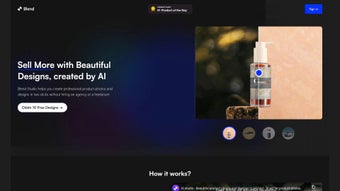

Download AI Studio – AI‑Powered Product Photography Tool for E‑Commerce
Introduction
In the fast‑moving world of online retail, visual content is often the deciding factor between a click and a cart abandonment. Brands that can deliver high‑quality, eye‑catching product images at scale gain a competitive edge, but traditional photo studios require expensive equipment, skilled photographers, and time‑consuming post‑production work. AI Studio answers this challenge by offering a cloud‑based, AI‑driven platform that creates professional‑grade photographs from a simple text prompt.
Whether you run a boutique Etsy shop, manage a Shopify store, or handle a large catalog of SKUs, the tool promises to turn a raw product shot into a polished, market‑ready image in seconds. This review dives deep into the core capabilities of AI Studio, explores how the service works from sign‑up to final export, and evaluates its strengths and limitations for businesses of all sizes. By the end of the article, you’ll have a clear understanding of whether AI Studio fits your visual content workflow, how it compares to traditional photography solutions, and what steps you need to take to start generating stunning product photos today.
Product Overview & Core Features
AI Studio is a browser‑based application that leverages cutting‑edge diffusion models and deep‑learning background removal engines to automate the creation of product photography. Users upload a raw image, describe the desired scene in natural language, and the platform instantly produces a photorealistic background that matches lighting, perspective, and style. The generated image can then be placed into one of hundreds of pre‑designed templates tailored for social media ads, e‑commerce listings, or promotional banners.
Because everything runs in the cloud, there is no need for high‑end GPUs or specialized software on the user’s device; a standard laptop, tablet, or even a smartphone can handle the entire workflow. AI Studio also integrates directly with popular e‑commerce platforms, allowing one‑click publishing to Shopify, WooCommerce, Etsy, and more. Security is built into the service with TLS 1.3 encryption, GDPR compliance, and automatic weekly model updates that improve realism without user intervention.
- AI‑generated background scenes from natural‑language prompts
- One‑click background removal with edge‑preserving accuracy
- HD and 4K image exports in PNG, JPEG, or WebP formats
- Library of 250+ professionally designed templates
- Batch processing for multiple SKUs in a single session
- Secure cloud storage with version history and auto‑save
- Direct API and native integrations for Shopify, WooCommerce, Etsy, BigCommerce
- Weekly AI model updates that enhance lighting realism and style variety
The workflow is deliberately simple: after uploading a product photo, the AI instantly isolates the item using a convolutional neural network trained on millions of retail images. Users then type a concise description—such as “minimalist white marble countertop with soft natural light”—and the diffusion model renders a matching backdrop within 5‑10 seconds. The system automatically adds subtle shadows and reflections to ensure the product appears naturally placed. From there, a template can be selected, branding elements added, and the final composition exported or published. The combination of speed, automation, and a growing template library makes AI Studio a compelling alternative to hiring photographers or outsourcing design work.
Installation, Usage Instructions & Compatibility
Getting Started – Account Creation & Access
AI Studio is delivered as a Software‑as‑a‑Service (SaaS) solution, so there is no traditional installation process. To begin, visit the official website aistudio.example.com, click “Start Free Trial,” and register using an email address or social login (Google, Apple). After confirming your email, you gain immediate access to the web dashboard, which is fully responsive and works in any modern browser that supports HTML5 and WebGL.
Step‑by‑Step Workflow
- Upload your raw product image: Drag‑and‑drop or click the “Upload” button. Supported file types include JPEG, PNG, and WebP, with a maximum size of 50 MB per image.
- Auto‑remove background: Press “Auto‑Remove.” The AI isolates the product, preserving fine details such as hair‑like threads on jewelry or reflective surfaces on electronics. A manual brush tool appears for quick edge tweaks.
- Generate a background: In the “Prompt” field, type a concise description (e.g., “rustic wooden table with warm morning light”). Click “Generate” and watch the AI render a photorealistic scene in under ten seconds.
- Select a template: Browse the template gallery organized by use‑case (social ads, marketplace listings, printed catalog). Click “Apply” to instantly embed the product into the chosen layout, with automatic branding placement.
- Export or publish: Choose “Download HD” for a high‑resolution file, or use the “Publish to Store” button to push the image directly to Shopify, WooCommerce, Etsy, or any platform supported via API.
Supported Operating Systems & Devices
Because AI Studio runs entirely in the browser, it is compatible with all major operating systems that support modern web standards: Windows 10/11, macOS Monterey and later, major Linux distributions, Android 9 and above, and iOS 13 and later. The interface adapts to desktop monitors, tablets, and smartphones, allowing creators to edit on the go without sacrificing functionality.
Security, Updates & Pricing
All data transfers are encrypted with TLS 1.3, and the platform adheres to GDPR and CCPA guidelines. Users benefit from automatic weekly model updates that improve rendering speed, color accuracy, and style diversity—no manual patches are required. After the 7‑day free trial (which includes 50 HD downloads), subscription plans start at $19.99 USD per month, with discounts for annual billing and volume‑based pricing for enterprises.
Pros, Cons & Frequently Asked Questions
Pros
- Lightning‑fast AI background generation saves hours of manual editing.
- No need for costly photography equipment or studio rentals.
- Extensive library of over 250 ready‑made templates accelerates campaign launches.
- Cross‑platform accessibility works on Windows, macOS, Linux, Android, and iOS.
- HD and 4K exports provide print‑ready quality for catalogs and ads.
- Native integrations with Shopify, WooCommerce, Etsy, and API access streamline publishing.
- Secure cloud storage with version history protects assets and enables easy rollback.
- Weekly AI model upgrades improve realism without user intervention.
Cons
- Limited advanced manual editing tools; power users may miss fine‑tune controls.
- Custom template creation is not yet supported, restricting brand‑specific layouts.
- Subscription cost may be prohibitive for very small sellers on a tight budget.
- Continuous internet connection required; offline work is not possible.
- Batch processing speed can vary depending on server load during peak times.
FAQ
Can I use AI Studio for lifestyle or branding images that don’t contain a product?
Yes. While the platform is optimized for product shots, the AI can generate any background you describe, allowing you to create lifestyle scenes, brand‑centric visuals, or even abstract art for marketing purposes.
How does AI Studio handle copyrighted or trademarked elements in generated backgrounds?
All backgrounds are synthesized by the AI model from its internal training data and are unique to each request. The output does not contain pre‑existing copyrighted images, so users retain full commercial rights.
Is there a free tier or trial that lets me test the service before paying?
AI Studio offers a 7‑day free trial with 50 HD downloads, full access to the template library, and unlimited background generation during the trial period.
Which file formats can I export, and do they support transparency?
Exports are available in PNG (supports transparent backgrounds), JPEG (optimized for web), and WebP. All formats support resolutions up to 4K, making them suitable for both digital and print media.
Can I integrate AI Studio into my existing design pipeline, such as Adobe Photoshop or a custom CMS?
Absolutely. After generating an image, you can download it and open it in Photoshop, Illustrator, or any other editing suite for further refinement. Additionally, AI Studio provides RESTful API endpoints that let developers trigger image generation directly from a CMS or automation script.
Conclusion & Call to Action
AI Studio bridges the gap between high‑end product photography and the rapid pace of e‑commerce publishing. By turning a simple textual prompt into a polished, HD image in seconds, the platform empowers brands of any size to produce market‑ready visuals without the traditional overhead of studios, photographers, or graphic designers. The combination of an intuitive UI, a robust library of templates, seamless integrations with leading e‑commerce platforms, and secure cloud‑based processing makes AI Studio a strong contender for anyone looking to scale visual content quickly and cost‑effectively. While power users may crave deeper manual editing controls and the ability to design custom templates, the overall speed, quality, and affordability more than compensate for those limitations. If you’re ready to elevate your product listings, increase conversion rates, and reclaim hours of editing time, click the button below to start your free trial and experience AI‑driven product photography for yourself.



.png)



